

Shopping for an AM5 motherboard feels a bit like ordering coffee in a fancy café. B840, B850, X870, X870E. The names all look the same, the prices don’t, and nobody behind the counter explains what the letters mean.
So let’s fix that. For most gaming PCs, B850 is the one to get. It lets you overclock, it gives you a fast PCIe 5.0 slot for your main SSD, and the things it leaves out barely matter for games right now. X870 makes sense if you want USB4 and a PCIe 5.0 graphics slot guaranteed. X870E is for people who need a lot of extra storage slots and ports.
The reasons are below, and they all come from AMD’s own spec sheets.

The chipset doesn’t make your CPU faster
This is the part that trips most people up. According to AMD, every AM5 chipset works with every AM5 processor, from a Ryzen 5 7600 all the way up to a Ryzen 9 9950X3D. The chipset doesn’t change how fast that processor runs. What it changes is how much stuff the board can plug in around it: how many fast slots, how many USB ports, how many drives.
Think of the CPU as the engine and the chipset as the number of seats and cup holders. A nicer interior is great, but it won’t win you the race.
How the four chipsets compare
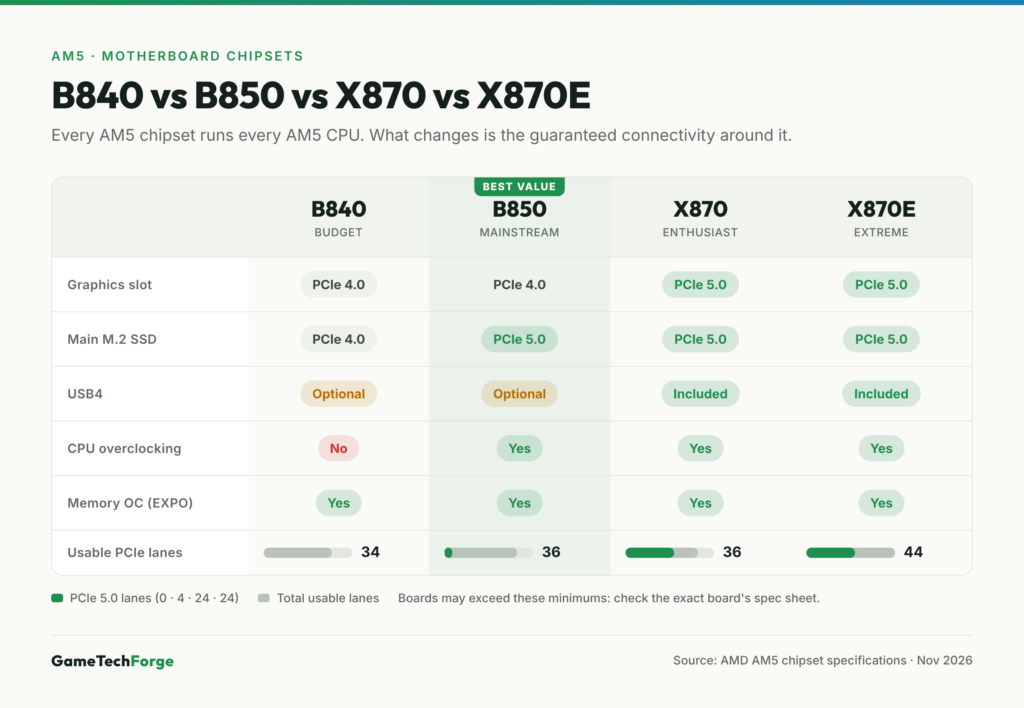
Here’s what AMD guarantees as a minimum for each one. Board makers can always add more on top.
| B840 | B850 | X870 | X870E | |
|---|---|---|---|---|
| Graphics card slot | PCIe 4.0 | PCIe 4.0 | PCIe 5.0 | PCIe 5.0 |
| Main SSD slot | PCIe 4.0 | PCIe 5.0 | PCIe 5.0 | PCIe 5.0 |
| USB4 | Optional | Optional | Included | Included |
| Usable PCIe lanes (total / PCIe 5.0) | 34 / 0 | 36 / 4 | 36 / 24 | 44 / 24 |
| CPU overclocking | No | Yes | Yes | Yes |
| Memory overclocking (EXPO) | Yes | Yes | Yes | Yes |
Source: AMD’s AM5 chipset page and its Socket AM5 quick reference guide.

A “lane” is like a lane on a highway for data, and PCIe 5.0 lanes are the fast lanes. Here’s the funny part. B850 and X870 have exactly the same number of usable lanes, 36. The difference is how many of them are fast lanes. B850 gets 4, which is enough for one speedy SSD. X870 gets 24, enough for the SSD and the graphics card.
X870E goes further by cheating a little, in a good way. Corsair explains that X870 uses one AMD chipset chip called Promontory 21, and X870E chains two of them together. That second chip is where the extra lanes and ports come from, with roughly twice the USB and SATA connections of X870.
B840 is in a different league. It can’t overclock the CPU and has no PCIe 5.0 at all. It’s built for budget machines and overlaps with the older A620.

Does a PCIe 5.0 graphics slot matter for gaming?
Right now, not much. Today’s graphics cards rarely come close to filling up a PCIe 4.0 slot that uses all 16 lanes. To put a number on it, a PCIe 4.0 slot with 16 lanes moves as much data as a PCIe 5.0 link with 8 lanes. Independent reviewers have found the gaming difference between them to be small, again and again.
There’s one exception. Some cheaper graphics cards only use 8 lanes instead of 16. On those, the slot’s generation matters more, because the card is already working with half the road.
So a PCIe 5.0 graphics slot is a nice bonus, not a reason to pay for X870 by itself. If you plan to keep the board through a few graphics card upgrades, it’s sensible future-proofing.
What about USB4?
USB4 can move up to 40 gigabits per second, which is very fast. It’s handy if you own fast external SSDs, a USB4 or Thunderbolt dock, or a monitor that runs over a USB-C cable. If your USB life is a mouse, a keyboard, a headset and the odd flash drive, you’ll never miss it. Some B850 boards include USB4 anyway, since AMD lists it as optional there rather than banned.
Will a fancier chipset give me more FPS?
No. Your frame rate comes from the CPU, the graphics card and the memory. There are two related things worth knowing, though.
Pricier boards tend to have beefier power delivery, the parts that feed electricity to the CPU (you’ll see them called VRMs). That matters if you run a 16-core Ryzen 9 flat out for hours. It matters a lot less for a Ryzen 7 9800X3D playing games. If you care, look up a reviewer’s VRM temperature results for the exact board, not the chipset name.
Memory support also comes down to the board’s design and its BIOS, not the chipset. All four chipsets support EXPO, AMD’s one-click memory speed profiles.
So which one should you buy?

If you want the best value gaming board and plan to keep your graphics card for a few years, get B850. If USB4 and a PCIe 5.0 graphics slot are on your wish list, X870 gives you both without charging you for extras you won’t use. If you need four or more M.2 slots, piles of USB and SATA, or you’re building a workstation, X870E is the one. And if you’re building the cheapest Ryzen PC you can and won’t overclock, B840 or a discounted B650 will do the job.
Don’t ignore older 600-series boards on sale either. B650, B650E, X670 and X670E boards all run Ryzen 9000 chips too. AMD notes they might need a BIOS update first, which you can usually do without even installing a CPU (our BIOS Flashback guide walks you through it). A B650E board, for example, offers PCIe 5.0 for both the graphics card and the SSD, according to AMD’s quick reference guide.
One last tip. Once you’ve picked a chipset, stop comparing chipset names and start comparing actual boards. The number of M.2 slots, the ports on the back, the power delivery and the BIOS support will make more difference to you than the letters on the box.
How we researched this guide: the chipset specs come from AMD’s AM5 chipset page and its Socket AM5 quick reference guide (November 2024), checked on November 27, 2026. Board makers can add features beyond these minimums, so always confirm on the spec page of the exact board you’re looking at.


